






TP-Link VIGI NVR1108H-W 8 Channel WiFi Network Video Recorder
VIGI-NVR1108H-W | TP-LinkThis product has been discontinued
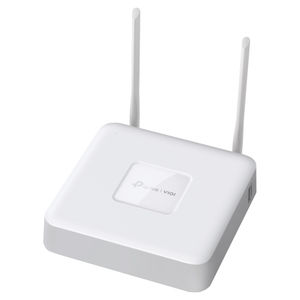
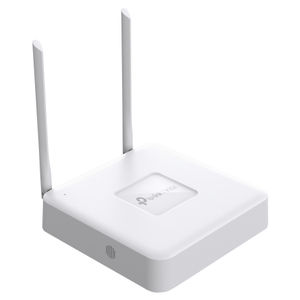
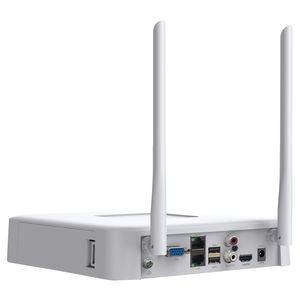
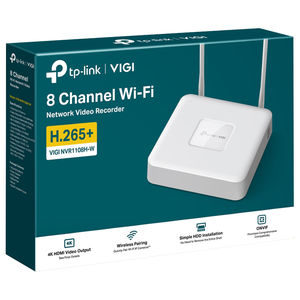


The TP-Link VIGI NVR1108H-W 8 Channel WiFi Network Video Recorder features 4K HDMI video output, 16MP decoding, seamless wireless pairing, and 8-channel playback. With H.265+ compression, ONVIF compatibility, remote monitoring, and support for up to 10TB of storage (HDD not included), it's perfect for 24/7 recording. Easy setup is ensured with Auto Initialise and secure wireless operation via WPA-PSK/WPA2-PSK.
Features
VIGI NVR1108H-W - VIGI 8 Channel Wi-Fi Network Video Recorder
- 8-Channel Live View and 4K HDMI Video Output
- Built-in Routing Module and Support Wireless Pairing (The NVR requires a stable network environment for continuous recording. We recommend only connecting the NVR to cameras to prevent other clients from using bandwidth.)
- Up to 8-ch @ 2MP (25fps) / 4-ch @ 4MP (25fps) Decoding Capability
- 8-Channel Synchronous Playback (The number of simultaneously playable channels may be fewer than eight, or none, if the total resolution exceeds 16MP.)
- 80 Mbps Incoming Bandwidth and 60 Mbps Outgoing Bandwidth
- 1 SATA Interface (up to 10 TB) (HDD is not included.)
- H.265+ Compression Technology
- HDMI and VGA Simultaneous Output
- Remote Monitoring

Security Never Shuts Down
- 8-Channel Live View
- 4K HDMI Video Output
- Wireless Paring (The NVR requires a stable network environment for continuous recording. We recommend only connecting the NVR to cameras to prevent other clients from using bandwidth.)
- 8-Channel Synchronous Playback (The number of simultaneously playable channels may be fewer than eight, or none, if the total resolution exceeds 16MP.)
- Simple HDD Installation (HDD is not included.)
- Smart Video Coding
- Comprehensive Compatibility (This model currently supports ONVIF Profile S.)
- Auto Initialise
- 1 SATA (Up to 10 TB) (HDD is not included.)
- Built-In Speaker
Simple HDD Installation
1. Press and hold the side cover latch to remove the side cover.
2. Push the HDD to insert it into the hard disk slot.
3. Fasten the screws to secure the HDD, using the correct HDD screw holes.
4. Reinstall the side cover.
Auto Initialise for Quick Configuration
Just click “Auto Initialise” to set up basic IPC and hard disk parameters, greatly reducing your configuration time.
- Click "Auto Initialise"
- Initialising
- Done
Build Features

Front

Back
Specifications
General Data
| Model Number | VIGI-NVR1108H-W |
| Storage Temperature | -40–70 °C |
| Storage Humidity | 10%~90% RH Non-Condensing |
| What's Included | VIGI Network Video Recorder Power Adapter HDD Screws Mouse Quick Installation Guide |
| Working Temperature | NVR: -10–55 °C Power Adapter: 0–40 °C |
| Working Humidity | 10%~90% RH Non-Condensing |
| Dimensions ( W x D x H ) | Excluding Antennas: 7.9 x 7.9 x 1.7 in (200.3 x 200.3 x 43 mm) |
| External Power Supply | DC 12V/2A |
| Net Weight | 0.5 kg |
| Gross Weight | 1.0 kg |
| Power Consumption | 5.7 W (Without Disk) 16.3 W (Without Disk) |
| Antenna | Quantity: 2 Type: 2.4GHz Welded Non-detachable Antenna Gain: 5.3dBi Radio Frequency Transmit Power: 16dBm Length: 198.8 mm for Long Side and 189 mm for Short Side |
| Certifications | BSMI, CE, HDMI, JRF, KC, NCC, NTRA, VCCI |
Video/Audio
| IP Video Input | 8-Channel |
| Incoming Bandwidth | 80 Mbps |
| Outgoing Bandwidth | 60 Mbps |
| HDMI Output Resolution | 1 Channel, Resolution: 3840 x 2160/30Hz, 1920 x 1080/60Hz, 1680 x 1050/60Hz, 1440 x 900/60Hz, 1280 x 1024/60Hz, 1280 x 720/60Hz |
| VGA Output Resolution | 1 Channel, Resolution: 1920 x 1080/60Hz, 1680 x 1050/60Hz, 1440 x 900/60Hz, 1280 x 1024/60Hz, 1280 x 720/60Hz |
| Video Output Mode | HDMI/VGA Simultaneous Output |
| Multi-View Display | 1/4/6/8 |
Decoding
| Audio Compression | G.711A/G.711U/G.726 |
| Video Compression | H.265+/H.265/ H.264+/H.264 |
| Record Resolution | 8 MP / 5 MP / 4 MP / 3 MP / 1080p / UXGA / 720p / VGA / 4CIF / DCIF / 2CIF / CIF / QCIF |
| Synchronous Playback | 8-Channel† |
| Capability | 25fps: 2-ch @ 8MP, 4-ch @ 4MP, 8-ch @ 2MP 30fps: 4-ch @ 3MP, 2-ch @ 5MP |
Record Management
| Record Mode | Manual Recording Scheduling Recording Motion Detection Recording |
| Playback Mode | Instant Playback Regular Playback Tag Playback Event Playback |
| Backup Mode | Regular Backup Video Clip Backup |
| Playback Function | Play Pause Stop Fast Forward Fast Backward Play By Frame Video Clip Export Clip Lock Recording Audio On/Off |
Network
| Protocol | UPnP (Plug and Play), NTP (Network Timing), SMTP, TCP/IP, UDP, ICMP, HTTP, HTTPS, DHCP, RTSP, SSL/TLS, RTP, IPv4, ARP |
| Mobile Phone Access | Android, iOS |
| Web Browser | Chrome (57+), Firefox (52+), Edge (91+) |
| Interoperability | ONVIF Profile S/T/G, CGI |
Wireless
| Standards | IEEE 802.11b/g/n |
| WiFi Channels | UN: 1-13 US: 1-11 |
| Wireless Name | SSID Configuration Radio |
| Network Switch | Yes |
| Frequency | 2.4 GHz |
| Radio Bandwidth | Auto: Yes 20M: Yes 40M: Yes |
| Wireless Rate | 300Mbps (802.11n), 2 x 2 MIMO |
| Wireless Security | WPA-PSK/WPA2-PSK |
External Interface
| Network Interface | 1 x RJ-45 10/100 Mbps Self-Adaptive WAN/LAN Ethernet Interface 1 x RJ-45 10/100 Mbps Self-Adaptive LAN Ethernet Interface |
| USB Interface | 2 x USB 2.0 |
| Audio Interface | 1-ch RCA Input; 1-ch RCA Output |
| Alarm In/Out | N/A |
| Serial Interface | N/A |
| Power | 1 x DC Jack |
| Reset Button | 1 |
| Speaker | 1; Real-time Audio Output without Needing Peripherals. |
| HDMI | 1 |
| VGA | 1 |
Hard Disk
| SATA | 1 SATA Interface |
| Capacity | Up to 10 TB Capacity for Each HDD (HDD is not included.) |
Alarm
| General Alarm | Motion Detection Video Tampering Scene Change Detection Line-Crossing Detection Intrusion Detection Region Entering Detection Region Exiting Detection Loitering Detection Object Abandoned/Removal Detection Vehicle Detection Human Detection Abnormal Sound Detection Smart Frame Note: The alarm function requires the use of a camera. |
| Anomaly Alarm | Video Loss Offline and IP Conflict Disk Exception Login Exception Note: The alarm function requires the use of a camera. |
| Alarm Linkage | Recording White Light Alarm Log Audible Alarm Note: The alarm function requires the use of a camera. |
Backed by a 3 year TP-Link warranty.
