






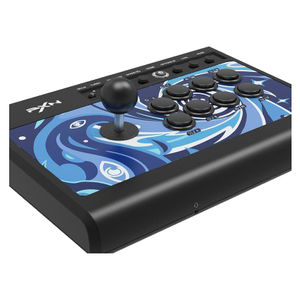
PXN 008 Arcade Fight Stick
PXN-008 | PXNThis product has been discontinued
Features

PXN-008 Arcade Fightstick
Hardcore Fighting Joystick Ashes-Level Classic Reproduction
- Vintage Circular Joystick: Arcade Heritage
- Plug and Play: USB Interface
- Blue Switch Mechanical Buttons: Swift and Clean
- TURBO Function: One-Button Combo
- Play on 5 Major Platforms: PC PS4 NS ANDROID PS3 XBOXONE XBOXSERIES
- 3.5mm Audio Jack: Immersive Gaming

Reproduce the Authentic Arcade Heritage
Salute to the Beautiful Arcade Era.

Classic Circular Joystick 360° Wide-Angle Ultimate Move
Constructed from highly durable steel, the joystick ensures hardcore precision without any drifting. It offers a smooth, rounded feel and is incredibly responsive, without any lag.

Blue Switch Mechanical Buttons
Swift and precise response.
- Authentic Mechanical Switches for a satisfying keystroke experience
- 2mm Trigger for faster feedback
- 70g Lightweight trigger
Note: Buttons do not support hot-plugging

50 Million Presses
Button feel remains the same as before.
Advanced Assist Settings Master the Techniques of Offence and Defence
One-button switching of DP (D-pad) / LS (Left Joystick) functions to meet different needs.
One button Turbo function enables rapid enemy takedowns, where speed conquers all.
For more details on function buttons, please refer to the manual or consult customer service.

Industrial-Grade ABS Panel
Durable, waterproof, and fade-resistant.

Universal USB-A Connection
Compatible with 5 major platforms.
Device Connection Methods
Connecting 008 with PC
- Step 1: Plug the USB cable of the arcade stick into the computer, and the channel light "Home" will remain on.
- Step 2: When connecting to the computer for the first time, it will prompt to find new hardware and automatically complete the driver installation.
- Step 3: Open the game controller settings on your computer to perform a functionality self-test. Here are the specific steps: Win7 or above systems: Open the Control Panel → Device and Printer Right-click on the game controller icon → Select Game Controller Settings → Click on Properties for testing.
Connecting 008 with PS4 Console
- Step 1: Turn off the original PS4 controller and connect it to the arcade stick's controller interface using the USB data cable.
- Step 2: Plug the main USB cable of the arcade stick into the PS4 console and turn on the console.
- Step 3: Press the "Home" button on the arcade stick once. The "Home" channel light on the arcade stick will stay on to indicate a successful connection.
Connecting 008 with X-SERIES X Console
- Step 1: Turn off the original X-ONE/SERIES controller and connect it to the arcade stick's controller interface using the USB data cable.
- Step 2: Plug the main USB cable of the arcade stick into the X-ONE/SERIES console and turn on the console.
- Step 3: The "Home" channel light on the arcade stick will stay on to indicate a successful connection
Connecting 008 with Android TV
- Plug the main USB cable of the arcade stick into Android TV to use it.
(*Note: Due to customisation of the Android TV system, some Android TV systems do not support the insertion of external devices.)
Specifications
| Model Number | PXN-008 |
| Compatible Systems | Android 4.4 and above devices, Windows 7 / 8 / 10 / 11 |
| Compatible Platforms | PC PS3 PS4 Xbox one Xbox Series X|S Switch NS Android |
| Product Dimensions | 335 x 230 x 108 mm |
| Charging Voltage | USB Standard 5 V |
| USB Power Cable Length | About 2000 mm |
| Item Weight | 1500 g |
| Colour | Black |
| Note | The data provided on this page is theoretical and comes from third-party testing agencies and the PXN Lab. It was obtained under specific conditions. Actual usage may vary slightly due to product variations, software versions, usage conditions, and environmental factors. Please refer to the actual usage scenario for accurate information. |
