






ASUS ROG Maximus Z690 Formula DDR5 Motherboard
ROG-MAXIMUS-Z690-FORMULA | ASUSThis product has been discontinued
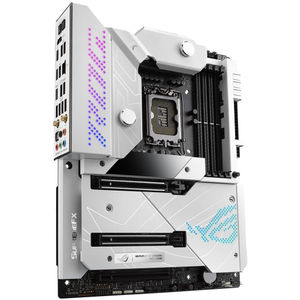
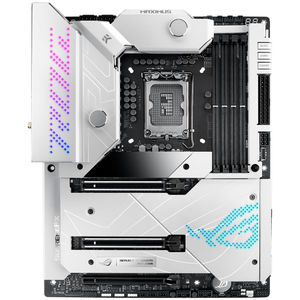
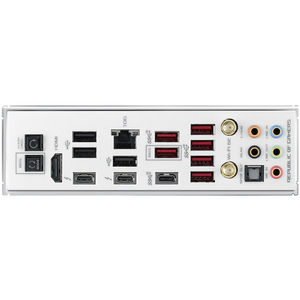
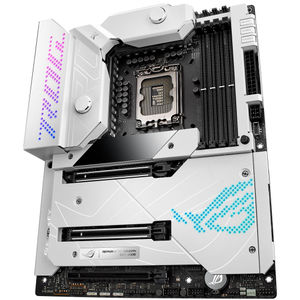

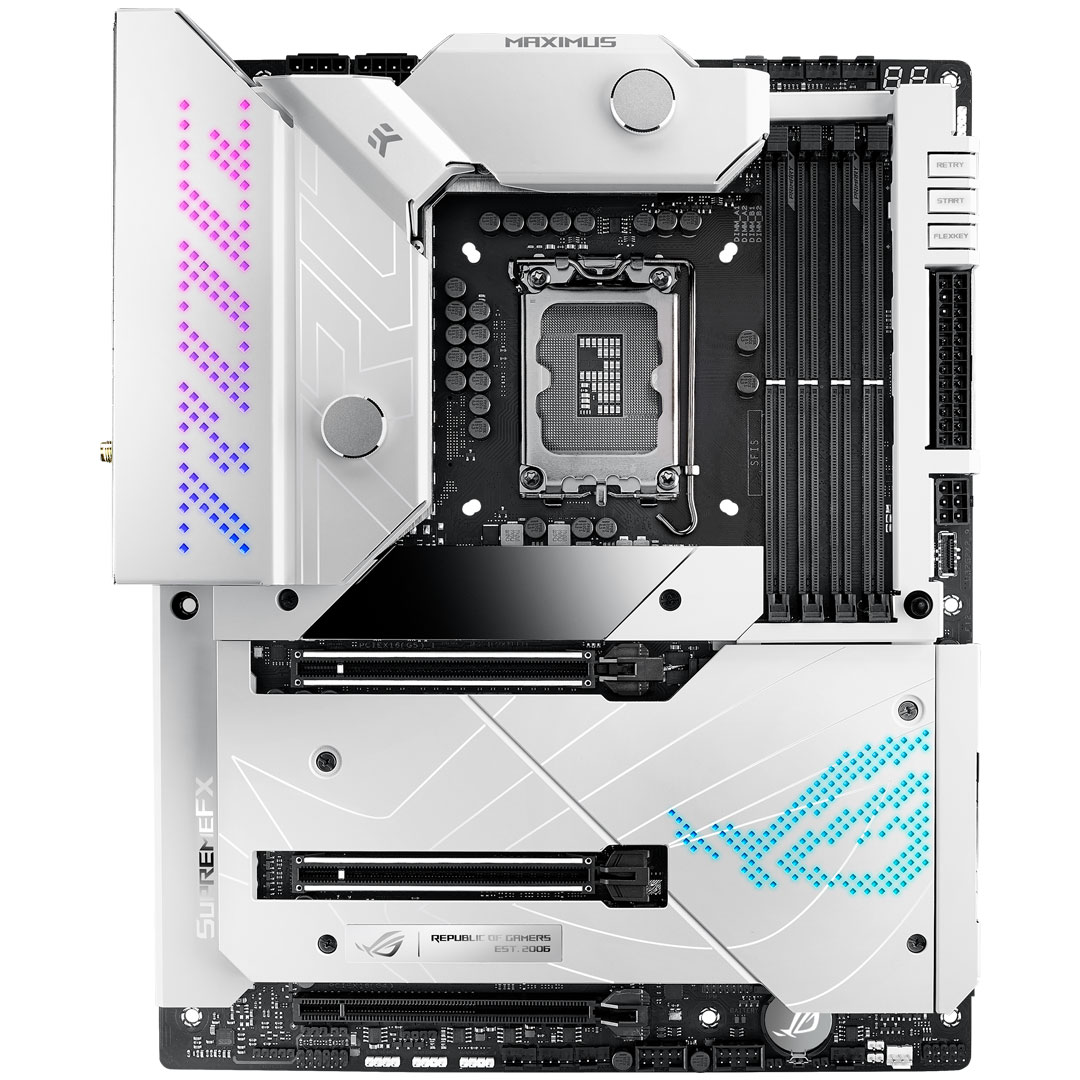
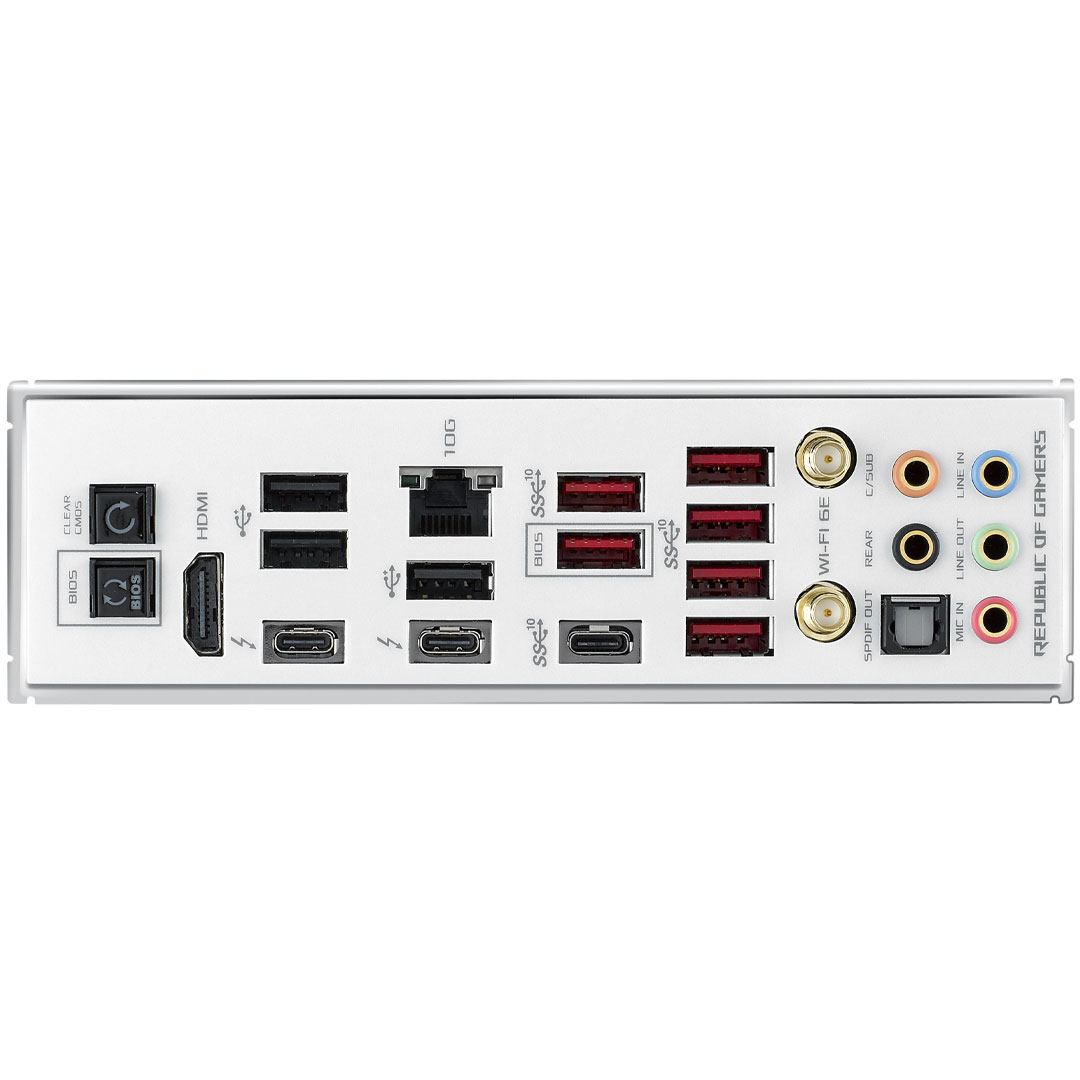

|
Warning: This product contains a button battery - If swallowed, a lithium battery can cause severe or fatal injuries with 2 hours. - Keep batteries out of reach of children. - If you think batteries may have been swallowed or placed inside any of the body, seek immediate medical attention. |
Features
Features of the ASUS ROG Maximus Z690 Formula D5 Motherboard at a glance:
Intel® Z690 ATX motherboard with 20+1 power stages, DDR5, Five M.2, USB 3.2 Gen 2x2 front-panel connector, Dual Thunderbolt™ 4, PCIe® 5.0, Onboard WiFi 6E, 10 Gb Ethernet and Aura Sync RGB lighting
Diversity to the Maximus. That’s what the latest Formula brings to the acclaimed ROG Maximus series. Its Moonlight White armour and customizable ARGB lighting elements ride alongside a hybrid VRM block designed in collaboration with EK, giving you ample freedom to express your preferred build style. And underneath, circuit pathways illuminated with PCIe® Gen 5.0 and limit-breaking DDR5 support are poised to elevate performance well into the future, driving the Maximus Z690 Formula's appeal far beyond aesthetics.
- Socket LGA 1700 for 12th Gen Intel® Core™, Pentium® Gold and Celeron® processors
- Intelligent Control: ASUS-exclusive tools including AI Overclocking, AI Cooling, AI Networking and Two-Way AI Noise Cancelation for easy configuration
- Robust Power Solution: 20+1 teamed power stages rated for 105 A, ProCool II power connectors, MicroFine alloy chokes and premium metallic capacitors
- Optimized Thermal Design: Enlarged VRM heatsinks with EK CrossChill III solution, high-conductivity thermal pads, triple M.2 heatsinks and two M.2 backplates, and ROG Water-Cooling Zone
- High-Performance Networking: Onboard WiFi 6E, Marvell® Action 10 Gb Ethernet, and ASUS LANGaurd
- Fastest Connectivity: PCIe® 5.0, dual Gen 4 M.2 onboard, ROG Hyper M.2 card with Gen 5 M.2 support, USB 3.2 Gen 2x2 front-panel connector and dual Thunderbolt™ 4 USB Type-C® ports
- Industry-Leading Audio: ROG SupremeFX ALC4082 with ESS® ES9018Q2C DAC for pinpoint positioning and dynamics
- Unmatched Personalization: 2-inch LiveDash OLED, ASUS-exclusive Aura Sync RGB lighting, including one RGB header and three addressable Gen 2 headers
- DIY-Friendly Design: Pre-mounted I/O shield, PCIe Slot Q-Release, Q-Latch, BIOS FlashBack™, Q-Code, FlexKey, Q-Connector, SafeSlot, ROG Hyper M.2 card, and ROG graphics card holder
- Renowned Software: Bundled 1year AIDA64 Extreme subscription and intuitive UEFI BIOS dashboard with integrated MemTest86
Intelligent Motherboard
Intelligent software solutions help ensure that your system performs at its best. The latest ASUS AI-powered enhancements span four pillars of performance, including overclocking, cooling, networking and onboard audio, making advanced tweaks and optimization accessible to new recruits and savvy PC DIY veterans alike.
AI Overlocking
Tuning is now faster and smarter than ever before. ASUS AI Overlocking profiles the CPU and Cooling to the predict the optimal configuration and push each system to its limits.
AI Cooling
Balance the thermals and acoustics of any build with a single click. A Proprietary ASUS algorithm reduces unnecessary system noise by monitoring CPU temperature and dynamically adjusting fans to optimal speeds.
AI Networking
GameFirst VI optimizes networking performance by allocating bandwidth in real time based on application usage scenarios and corresponding learning algorithms.
Two-Way AI Noise Cancellation
This utility leverages a massive deep-learning database to reduce over 500 million types of background noise from incoming or outgoing audio, helping ensure crystal-clear communication in games or calls.
Performance
The ROG Maximus Z690 Formula CPU VRM is comprised of 105 amp power stages that are strategically teamed to quickly cancel transients. Alongside, the ROG take on DDR5 support frees memory kits to achieve their full potential.
Power Solution - Teamed Power Architecture
Modern CPU architectures up the ante for motherboard power design by transitioning from deep power saving modes to full load almost instantaneously. The latest ROG VRM architecture rises to the challenge by utilizing teamed power stages to rapidly swing current, while maintaining exemplary thermal.
A Brief History
ASUS became the first manufacturer to implement phase doublers when we shipped the A8N32-SLI Deluxe back in 2005. The board’s VRM was lauded for elegantly overcoming the power handling capabilities of components that were available at the time while also reducing voltage ripple. Those benefits lead to phase doublers becoming universally accepted in the industry, and they are still used for similar purposes today.
A Shift in CPU Demands
Today’s CPUs pack more cores than their predecessors, and the latest instruction sets allow them to crunch computationally dense workloads at an incredible pace. As an added bonus, these processors also consume less power at idle and can transition between loads states much more quickly. These improvements necessitated a re-evaluation of power design priorities, because phase doublers add a propagation delay that hampers transient response.
While doublers help extend the number of effective phases, they do so at the cost of a processing delay.
Bucking the Trend
The latest integrated power components can handle higher currents than the devices of yesteryear, making it possible to implement a simple circuit topology that isn’t hamstrung by the processing lag of phase doublers. That’s why the ROG Maximus Z690 Formula utilizes teamed power stages to deliver higher burst current per phase, while maintaining the thermal performance of phase-doubled designs.
The teamed architecture allows two power stages to work in tandem to provide more power to the CPU.
Thermal Performance
Each VRM component serves a specific purpose. PWM controllers control the circuit, and the power stages do the heavy lifting from an electrical and thermal standpoint. That's why ROG Maximus Z690 Formula utilizes 20 power stages. The high-end power stages feature a low RDSON to reduce switching and conduction losses, helping to improve overall thermal headroom.
The MOSFETs within the power stages generate the most heat as they are responsible for voltage conversion and delivery to the CPU from the 12-volt EPS connector.

High-Quality Components
- 8+8 Pin ProCool II Power Connectors - Two ProCool connectors ensure a snug and reliable connection to the EPS 12V power lines
- 20+1 Power Stages - The VRM features 20+1 power stages, each rated to handle 105 amps
- MicroFine Alloy Chokes - Each power stage is accomplished by a high-permeability alloy-core choke rated to handle 45 amps
- 10K Black Metallic Capacitors - Input and output filtering is provided by solid-power capacitors rated to last thousands of hours at high operating temperatures

Memory
DDR5 Overclocking Strength
Comprehensive memory tuning options are the cornerstone of ROG motherboards. For DDR5, the Maximus Z690 lineup breaks performance limits by providing a stacked suite of overclocking parameters for not only high-speed kits, but even entry-level memory modules that have a locked power management IC (PMIC).
- A dedicated circuit on the motherboard safely circumvents DDR5 memory PMIC restrictions, allowing you to step past the default 1.1-volt limit and push frequency and timings to the max.
- Ordinarily, a restricted PMIC that has been unlocked requires the system to be fully power-cycled each time memory voltage is adjusted. ROG motherboards leverage onboard hardware and firmware to cleverly work around this irksome limitation, enabling voltage adjustments to be applied through the same soft system-reset process employed for previous generations of DDR memory.
Cooling
An ambition to maximize performance calls for an appropriately powerful platform. Enter the CrossChill EK III VRM block, empowering enthusiasts to break the limits of conventional voltage regulation with a hybrid cooling system that sails past the core power requirements of 12th Gen Intel Core processors while maintaining rock-steady thermals.

Crosschill EK III
The CrossChill EK III water block leverages a fusion of passive and liquid cooling to keep VRMS operating at high efficiency. The nickel water channel hidden *thin the block quietly cools the Formula's MOSFETS up to 63.7T more than air alone, while the standard SW threaded fittings are designed to integrate into existing setups with minimal effort.
Heatsinks - Cooler by Design
- CrossChill hybrid thermal design - Engineered with a nickel cooling channel that's incredibly effective at removing heat
- M.2 backplates - Dual M.2 slots feature backplate blocks that ensure high-performance drives deliver peak performance, even when airflow is restricted
- M.2 heatsinks - Three dedicated heatsinks keep up to three M.2 drives in the optimum operating temperature range for consistent performance and reliability
- High-conductivity thermal pad - A high-quality thermal pad improves overall heat transfer from the system by bridging the heat generated by the power stages to the heatsink
- Solid steel backplate - An electro-galvanized, cold-rolled coil construction backplate resists bending and helps draw heat away from the VRM
- Chipset heatsink - A dedicated chipset heatsink draws heat away to maintain optimum operating temperatures
Headers
Thermal Management
ROG Maximus Z690 Formula features comprehensive cooling options that are configurable via Fan Xpert 4 or the UEFI BIOS.
- Multiple temperature sources - Each header can be set to monitor and react to three user-configurable thermal sensors for workload-based cooling, and all settings can be easily managed by Fan Xpert 4 or via the UEFI
- 4-pin PWM/DC fan headers and ASUS Hydranode - Every onboard header auto-detects any PWM or DC fan, with two chassis fan headers offering ASUS HYDRANODE support
- Bundled ROG fan controller - A bundled fan controller card includes six additional DC and PWM fan headers, plus two thermal-probe headers
ROG Water-Cooling Zone
Dual water-temperature headers and a flow-rate header feed information straight into the AI Suite utility, allowing you to track coolant temperatures and the flow rate of the entire loop.
- Water pump+ - A dedicated header can supply over 3 amps to a high-performance PWM or DC water pumps
- Water in/out - A dedicated header enables monitoring of temperatures at the input/output points of any component
- Water flow - A dedicated header enables constant monitoring of flow rate throughout the entire loop
Connectivity
The latest connectivity solutions ― WiFi 6E, PCIe® 5.0 and two Thunderbolt™ 4 USB Type-C® ports ― empower supersmooth networking and blisteringly fast file transfers. And for enthusiasts looking for high-fidelity audio, the SupremeFX ALC4082 codec takes gaming immersion to a whole new level while also saving a PCIe slot.

Networking
WiFi 6E
Onboard WiFi 6E technology takes advantage of the newly available radio spectrum in the 6 GHz band, providing up to three times the bandwidth of the 5 GHz band and up to seven 160 MHz bands to deliver ultrafast wireless networking speeds along with improved capacity and better performance in dense wireless environments.
- WiFi 6E Antenna - The antenna has two built-in transmitters and receivers to enable faster transmission speeds, and it supports the 2.4, 5 and 6 GHz bands.
- Adjustable design - Four-way positioning enables better signal reception
- Magnetic base - A powerful magnetic base secures the antenna on the top or side of the PC case
Marvell® Action 10 Gbps Ethernet
Designed to meet the demanding requirements of power users and content creators, 10 Gbps onboard Ethernet provides a new level of home networking. With up to 10 times the bandwidth of standard gigabit Ethernet, you'll enjoy streaming uncompressed 4K UHD videos and system backups and file transfers that are faster than ever before.

USB Ports
USB 3.2 Gen 2x2 Type-C Front-Panel Connector with Quick Charge 4+
USB 3.2 Gen 2x2 adds an additional lane that can boost Type-C data transfers with speeds of up to 20 Gbps. The port also features Quick Charge 4+ technology that can quickly charge devices up to 60 W with a PCIe power supply cable plugged into the nearby 6-pin connector.
Two Onboard Thunderbolt 4 USB Type-C® Ports
Each port delivers up to 40 Gbps of bidirectional bandwidth for the latest high-speed devices and drives. Thunderbolt 4 also supports up to two external 4K displays and extends PCIe bandwidth to up to 32 Gbps.

Storage
Three Onboard M.2 Slots
ROG Maximus Z690 Formula features three onboard M.2 slots, with two offering support for PCIe 4.0 SSDs.
ROG Hyper M.2 Card PCIe 5.0 Ready
If users need more M.2 storage or even faster data transfers, the bundled ROG Hyper M.2 Card features two more slots, one of which is a PCIe 5.0 and ready to perform at up to twice the speed of the accompanying PCIe 4.0 slot.

Audio
SupremeFX
ROG SupremeFX audio technology delivers an exceptional 113 dB signal-to-noise ratio on the line-in connection to provide best-ever recording quality. There's also a low-dropout regulator for clean power delivery to the SupremeFX ALC4082 codec, and an ESS® 9018Q2C integrated DAC.
- Audio line shielding - Blocks electromagnetic interference from the motherboard or add-ons to provide cleaner audio
- ESS® SABRE 9018Q2C - The ESS® SABRE 9018Q2C integrated DAC amplifier is capable of providing -115 dB total harmonic distortion (THD+N) for playback that conveys all the subtlety and nuances of the audio track. In addition, the 121 dB dynamic range (DNR) provides an extremely low noise-floor, further accentuating dynamics and punch.
- ALC 4082 Codec - The ALC4082 codec uses USB instead of the conventional high-definition audio (HDA) interface and improves playback audio resolution from 192 to 384 kHz
- Switching MOSFETs - A unique design allows the codec's impedance-sensing function to be ported with either the front or rear headphone outputs
- Premium capacitors - High-quality integrated components help produce warm, natural-sounding audio with exceptional clarity
Optimization
ROG Maximus Z690 Formula is packed with intuitive and flexible tools that give builders next-level control of system performance.
5-Way Optimization
Level Up Performance
The dashboard-style control panels of AI Suite 3 and Armoury Crate let you fine-tune almost every aspect of your ROG Maximus Z690 Formula system with ease. Get the best balance between performance, cooling, stability, and efficiency via simple and intuitive interfaces.
TPU - CPU Performance Boost
The TurboV Processing Unit (TPU) is an intelligent onboard micro-controller that provides an array of system-tuning features, including the ability to fine-tune voltages, monitor system stats and adjust overclocking parameters.
EPU - All-Round Energy Efficiency
With the Energy Processing Unit (EPU) you] enjoy system wide power savings. The EPU automatically optimizes power consumption and maximizes savings with Away mode.
Fan Xpert - Flexible Cooling Controls for Air or Liquid
Enjoy comprehensive control over fans, water pumps and all-in-one (AI0) coolers via either Fan Expert 4 or the ASUS UEFI. Whether you're cooling with air or water, Auto-Tuning mode intelligently configures all parameters with a single click. There's also an Extreme Quiet mode, which reduces all fan speeds to below the default minimum — keeping your system whisper-quiet when performing light tasks.
Precise Digital Power Controls
The Digi+ voltage-regular module (VRM) delivers real-time control over voltage droop, switching frequency and power-efficiency settings, allowing you to fine-tune CPU voltage regulation for ultimate stability and performance.
Turbo Core App
Intel processors feature per-core tuning, end the ASUS Turbo app makes use of this feature by letting you assign applications to specific processor cores, prioritizing computing power where its needed most.
UEFI BIOS
The renowned ROG UEFI (BIOS) provides everything you need to configure, tweak, and tune your rig. It offers intelligently simplified options for newcomers to PC DIY, as well as more comprehensive features for seasoned veterans.
Advanced Mode
When you're ready for a deeper dive, delve into the UEFI's Advanced Mode and take complete control. This mode enables full control over every aspect of the motherboard, and a built-in search function helps you quickly find the setting you need.
- MemTest86 - Diagnose faulty RAM and memory problems that can lead to crashes or data issues. For added convenience, MemTest86 has been pre-installed into ROG UEFI (BIOS). Run the test to pinpoint memory issues with just one click, without the need for any USB stick or going into the OS. The memory report will also be stored in the BIOS archives for reference.
- My Favourites - Quickly locate tuning options and add preferred tools to your favourites list
- EZ Flash 3 - Flash the latest BIOS via the internet from within the BIOS
- S.M.A.R.T - Check your storage device self-motivation, Analysis, and reporting technology (S.M.A.R.T) logs to gauge reliability or to identify potential failures
- GPU Post - Automatically detect select ASUS graphics cards to view detailed information
- Secure Erase - Restore your SSDs and NVMe storage to factory settings
- Last Modified Log - Track the last change and save preferred profiles to a USB drive
- SATA Port Renaming - Rename SATA ports for easy identification
- ASUS User Profile - Port configuration settings between different BIOS versions or share them with friends
- Q-Fan Control - Configure the fan's operating speed manually or use pre-configured Standard, Silent, Turbo or Full Speed modes. By default, system fans will automatically switch to full speed if the temperature reaches 75°C
EZ Mode
Designed to simplify setup, EZ Mode presents vital settings and states on a single page. With guided wizards, drag-and-drop functionality, and one-slick application of important settings, your rig will be up and running in no time.
- Intuitive Graphical fan controls - Fine-tune individual fans simply by dragging a curve with the mouse
- Storage Information - View SATA port details for easy device recognition
- Fast and easy clock adjustment - Use the mouse to quickly change time and date settings
- Aura on/off mode (Stealth) - Easily enable or disable Aura RGB lighting or every onboard LED for a more subdued aesthetic
Differential Sensing - Accurate voltage Monitoring
Conventional motherboards use single-ended sensing tapped from a location that isn't ideal, leading to a large disparity between the actual voltage fed to the CPU and the value reported to software. ROG Maximus Z690 Formula features a differential-sensing circuit that simplify overclocking and tuning by allowing you to track voltages more accurately.
Personalization
ASUS-exclusive Aura Sync RGB customization takes the Formula’s Moonlight White colourway to a new level, and a two-inch OLED LiveDash can take the aesthetic further with a display featuring live system information or user-customizable graphics.
Aura Sync - Grow Your Gaming World
Gear up with ROG components — from graphics card and monitors to mice and keyboards. And up your game with complementary aesthetics, control and compatibility. The ROG ecosystem is more extensive than any competing brand, so you’ll enjoy greater choice as your system expands.
- Static
- Breathing
- Strobing
- Rainbow
- Colour cycle
- Starry night
- Music effect
- Smart
- Adaptive colour
- Dark
LiveDash OLED
The ROG Maximus Z690 Formula includes LiveDash, a built-in 2-inch OLED panel that shows useful information and features customizable graphics. During the power-on, self-test (POST) phase, the OLED shows key stats in simple language using traditional POST codes. In normal operation, the panel can be programmed to show CPU frequency, device temperatures, fan speeds or water-cooling information. You can also personalize the default OLED GIF with a preferred image or animation.
- Hardware Monitor
- Formula Exclusive
- BIOS Update
- Customization Content
Gaming Audio
Sonic Studio III
Sonic Studio supports HRTF-based (head-related transfer function*) virtual surround for headsets, casting an immersive aural landscape that draws you deeper into the action. The intuitive Sonic Studio interface also offers a range of EQ options and one-click presets, allowing you to tailor acoustics to suit personal preferences or the characteristics of your headset.
*A head-related transfer function is an audio algorithm derived from sound data recorded through a dummy head. Test tones are played from a spherical grid around the dummy head to obtain subtle changes in sounds that come from different directions. The results are combined into an algorithm that allows Sonic Studio's virtual surround to process sound true to life.
- Sonic Studio Link - Easily apply Sonic Studio effects on all playback devices. Simply press the Sonic Studio Link button to enjoy the effect on any playback device
- App-Specific Profiles - Apply customized audio settings to different applications, so everything you do is perfectly tuned to the way you want to listen
- Sonic studio virtual mixer - Combine audio output from selected apps with audio from the microphone input and stream the compiled mix
DTS : Sound Unbound
The ROG Maximus Z690 Formula includes a pre-loaded DTS® Sound Unbound™ app that envelops you in audio as never before, conjuring whole new levels of immersion for extraordinary gaming and entertainment experiences. By exploiting Windows Sonic spatial technology, DTS Sound Unbound delivers audio in a virtual 3D space — putting you right in the middle of the soundscape, where you can sense the location and direction of every gunshot, footstep or other sound in your virtual environment.
- Stereo Sound
- Surround Sound
- Spatial Sound
Armoury Crate
Armoury Crate is a software utility designed to give you centralized control of supported gaming products, making it easy to tune the look and feel of your system. From a single intuitive interface, Armoury Crate helps you customize RGB lighting and effects for compatible devices and synchronize them with Aura Sync to create a unified lighting scheme across your system. In addition, Armoury Crate’s Fan Xpert4 tool provides comprehensive control over fans, water pumps and all-in-one (AIO) coolers.
You can also use Armoury Crate to download drivers, software and user manuals, register products, and tap into a special news feed that connects you to the global ASUS gaming community.
- Aura Sync
- Fan Control
- Device Configuration
- Driver & Manual Download
- Gaming Highlight
- Account Management
AIDA64 Extreme
The ROG Maximus Z690 Formula includes a one-year AIDA64 Extreme subscription. This industry-leading system information tool provides detailed information about installed hardware and software, and it also provides benchmarks for measuring performance of the entire system or individual components. AIDA64 Extreme includes a monitoring and diagnostics feature to detect and prevent hardware issues. All vital system sensors can be tracked in real time, allowing voltage readings, fan speeds, and temperature information to be viewed on the desktop, sent to dedicated displays, or the OLED panels of ROG AIO liquid coolers*.
- ROG x AIDA64 Extreme
- Hardware Monitor Display

Graphics Card Holder
Featuring a magnetic base, adjustable slider and hinge, the ROG Graphics Card Holder banishes sag and provides support where it’s needed most.
Specifications
| CPU | Intel® Socket LGA1700 for 12th Gen Intel® Core™, Pentium® Gold and Celeron® Processors Supports Intel® Turbo Boost Technology 2.0 and Intel® Turbo Boost Max Technology 3.0 Refer to www.asus.com for CPU support list. Intel® Turbo Boost Max Technology 3.0 support depends on the CPU types. |
| Chipset | Intel® Z690 Chipset |
| Memory | 4 x DIMM, Max. 128GB, DDR5 6400+(OC) / 6200(OC) / 6000(OC) / 5800(OC) / 5600(OC) / 5400(OC) / 5200(OC) / 5000(OC) / 4800 Non-ECC, Un-buffered Memory Dual Channel Memory Architecture Supports Intel® Extreme Memory Profile (XMP) Actual memory data rate support depends on the CPU types and DRAM modules, for more information refer to www.asus.com for the Memory QVL (Qualified Vendors Lists). |
| Graphics | 1 x HDMI® port 2 x Intel® Thunderbolt™ 4 ports (USB Type-C®) support DisplayPort 1.4 and Thunderbolt™ video outputs Graphics specifications may vary between CPU types. Please refer to www.intel.com for any updates. Support 4K@60Hz as specified in HDMI® 2.1. VGA resolution support depends on processors’ or graphic cards’ resolution. |
| Expansion Slots | Intel® 12th Gen Processors 2 x PCIe 5.0 x16 slots (supports x16 or x8 / x8 modes) Intel® Z690 Chipset 1 x PCIe 4.0 x16 slot (supports x4 or x4 / x4 mode) Please check PCIe bifurcation table in Chapter 1. When ROG Hyper M.2 card is installed on PCIEX16(G5)_1, PCIEX16(G5)_2 will run x8 only and if ROG Hyper M.2 card is installed on PCIEX16(G5)_2, PCIEX16(G5)_1 will run x8 only. Supports Intel® Optane Memory H Series on PCH-attached PCIe slot. Storage Total supports 5 x M.2 slots and 6 x SATA 6Gb / s ports Intel® 12th Gen Processors M.2_1 slot (Key M), type 2242 / 2260 / 2280 / 22110 - Intel® 12th Gen processors support PCIe 4.0 x4 mode. Hyper M.2_1 slot (Key M) via ROG Hyper M.2 card, type 2242 / 2260 / 2280 / 22110 - Intel® 12th Gen processors support PCIe 5.0 x4 mode Intel® Z690 Chipset M.2_2 slot (Key M), type 2242 / 2260 / 2280 (supports PCIe 3.0 x4 mode) M.2_3 slot (Key M), type 2242 / 2260 / 2280 (supports PCIe 4.0 x4 & SATA modes) Hyper M.2_1 slot (Key M) via ROG Hyper M.2 card, type 2242 / 2260 / 2280 / 22110 (suppports PCIe 4.0 x4 mode) Hyper M.2_2 slot (Key M) via ROG Hyper M.2 card, type 2242 / 2260 / 2280 / 22110 (suppports PCIe 4.0 x4 mode) 6 x SATA 6Gb / s ports Intel® Rapid Storage Technology supports NVMe RAID 0 / 1 / 5, SATA RAID 0 / 1 / 5 / 10. Intel® Rapid Storage Technology supports Intel® Optane Memory H Series on PCH-attached M.2 slots. When ROG Hyper M.2 card is installed on PCIEX16(G5)_1, Hyper M.2_1 slot can support PCIe 4.0 x4 mode. When ROG Hyper M.2 card is installed on PCIEX16(G5)_2, Hyper M.2_1 slot can support PCIe 5.0 x4 mode. When ROG Hyper M.2 card is installed on PCIEX16(G4)_3, Hyper M.2_1 and Hyper M.2_2 slots can support PCIe 4.0 x4 mode. When ROG Hyper M.2 card is installed on PCIEX16(G5)_1 or PCIEX16(G5)_2, Hyper M.2_2 slot will be disabled. When ROG Hyper M.2 card is installed on PCIEX16(G4)_3, Hyper M.2_1 and Hyper M.2_2 slots can support PCIe 4.0 x4 mode. RAID configuration and boot drives are not supported on the SATA6G_E1-2 ports. |
| Ethernet | 1 x Marvell® AQtion 10Gb Ethernet ASUS LANGuard |
| Wireless & Bluetooth | Wi-Fi 6E 2x2 Wi-Fi 6E (802.11 a / b / g / n / ac / ax) Supports 2.4 / 5 / 6GHz frequency band Bluetooth v5.2 WiFi 6E 6GHz regulatory may vary between countries, and function will be ready in Windows 11 or later. |
| USB | Rear USB (Total 12 ports) 2 x Thunderbolt™ 4 ports (2 x USB Type-C®) 7 x USB 3.2 Gen 2 ports (6 x Type-A + 1 x USB Type-C®) 3 x USB 2.0 ports (3 x Type-A) Front USB (Total 9 ports) 1 x USB 3.2 Gen 2x2 connector (supports USB Type-C®) 2 x USB 3.2 Gen 1 headers support additional 4 USB 3.2 Gen 1 ports 2 x USB 2.0 headers support additional 4 USB 2.0 ports |
| Audio | ROG SupremeFX 7.1 Surround Sound High Definition Audio CODEC ALC4082 - Impedance sense for front and rear headphone outputs - Supports: Jack-detection, Multi-streaming, Front Panel Jack-retasking - High quality 120 dB SNR stereo playback output and 113 dB SNR recording input - Supports up to 32-Bit / 384 kHz playback |
| Audio Features | - SupremeFX Shielding Technology - ESS® SABRE9018Q2C DAC / AMP - Gold-plated audio jacks - Rear optical S / PDIF out port - Premium audio capacitors |
| Back Panel I / O Ports | 2 x Thunderbolt™ 4 USB Type-C® ports 7 x USB 3.2 Gen 2 port(s) (6 x Type-A + 1 x USB Type-C®) 3 x USB 2.0 ports (3 x Type-A) 1 x HDMI® port 1 x Wi-Fi Module 1 x Marvell® AQtion 10Gb Ethernet port 5 x Gold-plated audio jacks 1 x Optical S / PDIF out port 1 x BIOS FlashBack™ button 1 x Clear CMOS button |
| Internal I / O connectors | Fan and Cooling related 1 x 4-pin CPU Fan header 1 x 4-pin CPU OPT Fan header 1 x 4-pin AIO Pump header 4 x 4-pin Chassis Fan headers 1 x W_PUMP+ header 1 x 2-pin Water In header 1 x 2-pin Water Out header 1 x 3-pin Water Flow header Power related 1 x 24-pin Main Power connector 2 x 8-pin +12V Power connectors 1 x 6-pin PCIe Graphics Card connector Storage related 3 x M.2 slots (Key M) 6 x SATA 6Gb / s ports USB 1 x USB 3.2 Gen 2x2 connector (supports USB Type-C®) 2 x USB 3.2 Gen 1 headers support additional 4 USB 3.2 Gen 1 ports 2 x USB 2.0 headers support additional 4 USB 2.0 ports Miscellaneous 3 x Addressable Gen 2 headers 1 x AURA RGB header 1 x FlexKey button 1 x 12-1 pin Front Panel Audio header (AAFP) 1 x ReTry button 1 x SPI TPM header (14-1pin) 1 x Start button 1 x 10⁻¹ pin System Panel header 1 x Thermal Sensor header |
| Special Features | Extreme OC Kit - FlexKey button - ReTry button - Start button Extreme Engine Digi+ - 10K Black Metallic Capacitors - MicroFine Alloy Choke ASUS Q-Design - M.2 Q-Latch - PCIe Slot Q-Release - Q-Code - Q-Connector - Q-DIMM - Q-LED (CPU [red], DRAM [yellow], VGA [white], Boot Device [yellow green]) - Q-Slot ASUS Thermal Solution - CrossChill EK III - M.2 heatsink backplate - M.2 heatsinks - Steel backplate ASUS EZ DIY - BIOS FlashBack™ button - Clear CMOS button - CPU Socket lever protector - ProCool II - Pre-mounted I / O shield - SafeSlot - SafeDIMM AURA Sync - AURA RGB header - Addressable Gen 2 headers OLED 2” Front Panel USB 3.2 Gen 2x2 with Quick Charge 4+ Support - Support: up to 60W charging - Output: 5 / 9 / 15 / 20V max. 3A, PPS:3.3–21V max. 3A - Compatible with QC 4.0 / 3.0 / 2.0, PD3.0 and PPS To support 60W, please install the power cable to 6-pin PCIe Graphics Card connector or can only support 27W. ASUS HYDRANODE - 3 x Chassis fan support (CHA_FAN1P,CHA_FAN2P,CHA_FAN3P) Visit ASUS Website for the latest compatibility list. |
| Software Features | ROG Exclusive Software - ROG CPU-Z - GameFirst VI - Sonic Studio III + Sonic Studio Virtual Mixer + Sonic Suite Companion - Sonic Radar III - DTS® Sound Unbound - BullGuard Internet Security (1-year full version) ASUS Exclusive Software Armoury Crate - AIDA64 Extreme (1 year full version) - AURA Creator - AURA Sync - Fan Xpert 4 - Two-Way AI Noise Cancelation AI Suite 3 - 5-Way Optimization with AI Overclocking TPU EPU DIGI+ Power Control Turbo app MyAsus WinRAR UEFI BIOS AI Overclocking Guide ASUS EZ DIY - ASUS CrashFree BIOS 3 - ASUS EZ Flash 3 - ASUS UEFI BIOS EZ Mode MemTest86 |
| BIOS | 256 Mb Flash ROM, UEFI AMI BIOS |
| Manageability | WOL by PME, PXE |
| Operating System | Windows® 11 64-bit Windows® 10 64-bit |
| Form Factor | ATX Form Factor 12 inch x 9.6 inch ( 30.5 cm x 24.4 cm ) |
